Loading...
10 Core AI UX Principles for Designing Intelligent User Experiences
June 14, 2026
8 min read

1. Make It Clear When AI Is Involved
Users need to know when they're interacting with a machine, not a human. This isn't just an ethical point. It's a practical one.
When users know they're talking to AI, they adjust their expectations. They're more forgiving of limitations. They trust the system more because it's honest with them.
When users think they're talking to a human and find out they weren't, trust collapses instantly and it's very hard to rebuild.
Label AI-generated content clearly. Say "AI-suggested" or "Generated by AI" when it applies. Use interface elements like icons or labels to signal when AI is doing something. This is one of the simplest things you can do and it has a big impact on user trust.
SEO terms to know: AI transparency in UX, explainable AI design, ethical AI product design
2. Show Users What the AI Is Doing
Waiting is uncomfortable. Waiting with no information is worse.
When an AI is processing, thinking, or generating a response, show that work visually. This can be a typing indicator, a progress bar, a skeleton screen, or even just a simple message like "Analyzing your data..."
This does two things. First, it reduces anxiety. Users know something is happening. Second, it sets realistic time expectations. If a user sees a progress indicator moving through multiple steps, they understand it might take a few seconds, and they stay patient.
The mistake many teams make is treating AI processing like a regular page load. It's not. AI responses can be variable in length and time. Design for that variability explicitly.
3. Design for Uncertainty
AI is probabilistic. It doesn't always know the right answer. It makes educated guesses.
Your interface needs to communicate that honestly.
Instead of presenting every AI output as fact, build in signals of confidence. "We think this is the right answer" is different from "This is the right answer." Use softened language: "suggested," "estimated," "based on available data." Show confidence scores when they're relevant. Offer the user a way to verify or adjust the output.
Designing for uncertainty is not about making your product sound weak. It's about giving users the right mental model. When users understand that AI has limitations, they use it better, and they trust it more because it's not overselling itself.
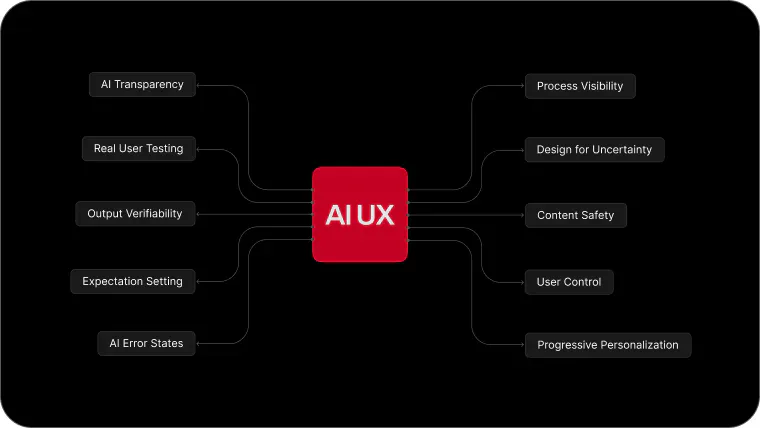
4. Give Users Control and an Easy Way Out
AI can be wrong. It will be wrong sometimes. The design question is: what happens then?
Users need to feel like they're still in control. They need to be able to correct the AI, override it, undo what it did, and turn it off if they want.
An AI that makes decisions and hides them from users creates anxiety. An AI that suggests things and lets users decide creates confidence.
Good AI UX design keeps the human in the loop. The AI assists. The user decides. That's the right relationship, at least for most consumer products right now.
Always include: an undo option after AI actions, a way to edit AI-generated content, a path to turn off AI features for users who don't want them, and clear confirmation before any irreversible AI action.
5. Personalize Progressively, Not All at Once
AI personalization is one of the most powerful things you can do for retention. When the product learns your preferences and adapts over time, it gets better with use. That's a strong reason to stay.
But there's a design mistake that many products make: they try to personalize too fast, too early, with too little data. The result is recommendations that feel off, interfaces that look different from what users expect, and experiences that feel intrusive rather than helpful.
The right approach is progressive personalization. Start with sensible defaults that work for most users. Collect data through actual usage. Adjust gradually. Be transparent when personalization is happening. Let users see and edit their preferences.
Users accept personalization when they understand it. They reject it when it feels like the product is making assumptions about them without permission.
6. Design Error States Specifically for AI Failures
Standard error states don't work well for AI failures.
A 404 error tells a user something didn't load. That's simple. But an AI error is more nuanced. The AI might have generated something wrong, something harmful, something irrelevant, or simply nothing useful at all.
Each of these failure modes needs its own response.
If the AI couldn't understand the request: tell the user clearly and suggest how to rephrase. If the AI generated something wrong: give the user an easy way to flag it and ask for something better. If the AI generated something potentially problematic: have content safeguards that catch it before it reaches the user and explain what happened.
Generic "Something went wrong" messages are especially damaging in AI products. Users already have some anxiety about AI being unreliable. Vague errors confirm that fear. Specific, helpful error messages rebuild confidence.
7. Set Expectations Before the User Starts
One of the most common AI UX failures is expectation mismatch. Users think an AI can do something it can't, try it, fail, and leave frustrated.
This happens because the marketing of AI products tends to be broad and the actual capabilities are narrow.
Good AI UX design closes this gap by being specific about what the product does well and what it doesn't do at all. Onboarding flows, contextual tooltips, example prompts, and first-use walkthroughs all help users understand the system before they form wrong expectations.
A user who knows the limits of your AI will get more value from it than a user who discovers the limits by running into them repeatedly.
8. Make AI Outputs Easy to Verify
When AI generates text, recommendations, data summaries, or analysis, users often want to know where it came from.
Designed well, AI outputs include a way for users to check the source, understand the reasoning, or see what data was used. This is especially critical in high-stakes domains like health, finance, legal, or business decisions.
Link to sources. Show the inputs that led to the output. Offer a "why did you suggest this" explanation where possible. Give users tools to validate what they're seeing.
This is what the industry calls explainability or explainable AI, and it's one of the most important frontier problems in AI design right now. Products that get it right will earn significantly more user trust than products that don't.
SEO terms: explainable AI UX, AI design best practices, transparent AI product design
9. Handle Sensitive and Harmful Content Carefully
AI systems trained on real-world data can generate biased, inappropriate, or harmful content. This is not hypothetical. It has happened in every major AI product.
As a designer, you are responsible for the guardrails around the AI, not just the interface on top of it. This means working with your engineering team to implement content filters. It means designing clear, calm messages when content is blocked and why. It means thinking through edge cases: what if a user asks for something harmful? What if the AI generates something offensive without being asked?
Harmful content handling is also an accessibility and inclusion issue. Content that targets or demeans specific groups of users is a product failure, not just a PR problem.
Build this into your design process from the beginning. It's much harder to retrofit.
10. Test with Real Users, Not Just AI Benchmarks
This is the principle that gets skipped the most often.
Technical teams measure AI quality by benchmarks: accuracy scores, BLEU scores, hallucination rates. These metrics matter, but they don't tell you whether real people can use the product, whether they trust it, or whether they'll come back.
AI UX testing needs to include actual users doing actual tasks. Watch where they get confused. Listen to what they expected to happen versus what did happen. Measure task completion and time-on-task. Run usability tests specifically around AI features, not just traditional UI flows.
The gap between how AI performs in a test environment and how users experience it in the real world is often wide. Closing that gap is a design job as much as an engineering job.
Why These Principles Matter Now
AI product development is moving extremely fast. Features ship before they're fully understood. Interfaces get designed around capabilities that aren't stable yet. Users are trying to learn how to use tools that are changing every few months.
This creates a massive opportunity for design teams that take AI UX seriously.
The products that will win in this space won't necessarily have the most capable AI. They'll have AI that users understand, trust, and want to use again. That's a design problem.
At Wincasoft, we help teams design AI-powered products that actually work for the people using them. Not just in demo mode, but in daily real-world use. If you're building something with AI and want the experience to match the capability, that's exactly the kind of problem we work on.
Ready to design a better AI product experience? Talk to the Wincasoft team and let's build something users will actually trust.


Your Team, Without the Hiring Hassle
Your team is ready. No hiring process needed.
Hire a Dedicated Team